
Why most AI features fail and a framework to find the ones that won't
The main reason most teams fail to move past "beta" AI features is that they lack clarity on where AI can bring the most value for their users. AI promised to be this revolutionary technology that would empower products to achieve new levels of productivity and creativity. Yet most product teams have not yet started building with AI. Most PMs are still locked out of AI development, a few data scientists or engineers singlehandedly control the implementation. For those who have tried to bring AI to their product, they default to the pattern that the most visible AI products have established: the chatbot.
Somehow, in the last year, "AI feature" has become synonymous with "prompt-based chat box." I experienced this firsthand a few weeks ago.
The chat-box became the only option to adding AI in products
I was preparing a Product Thinking training session for a Fortune 500 company. I spent hours on the content, structure, and how to make the session interactive for an audience of engineering team leaders. I decided to create a collaborative workshop where I would apply my framework with students in real time.
After finalizing the topic, structure, and framework, I needed a collaboration board for both in-person and online participants. I turned to Miro, thinking it would be the most familiar tool for the exercise.
It had been a while since I'd used Miro. To my surprise, when I created a new board, there was a big chatbot in the middle of the empty canvas.
At this point it was past 9 PM. I was tired, with limited energy to spend drawing a beautiful workshop board from scratch. So as soon as I saw the chatbot, I thought: This is exactly the type of AI support I need.
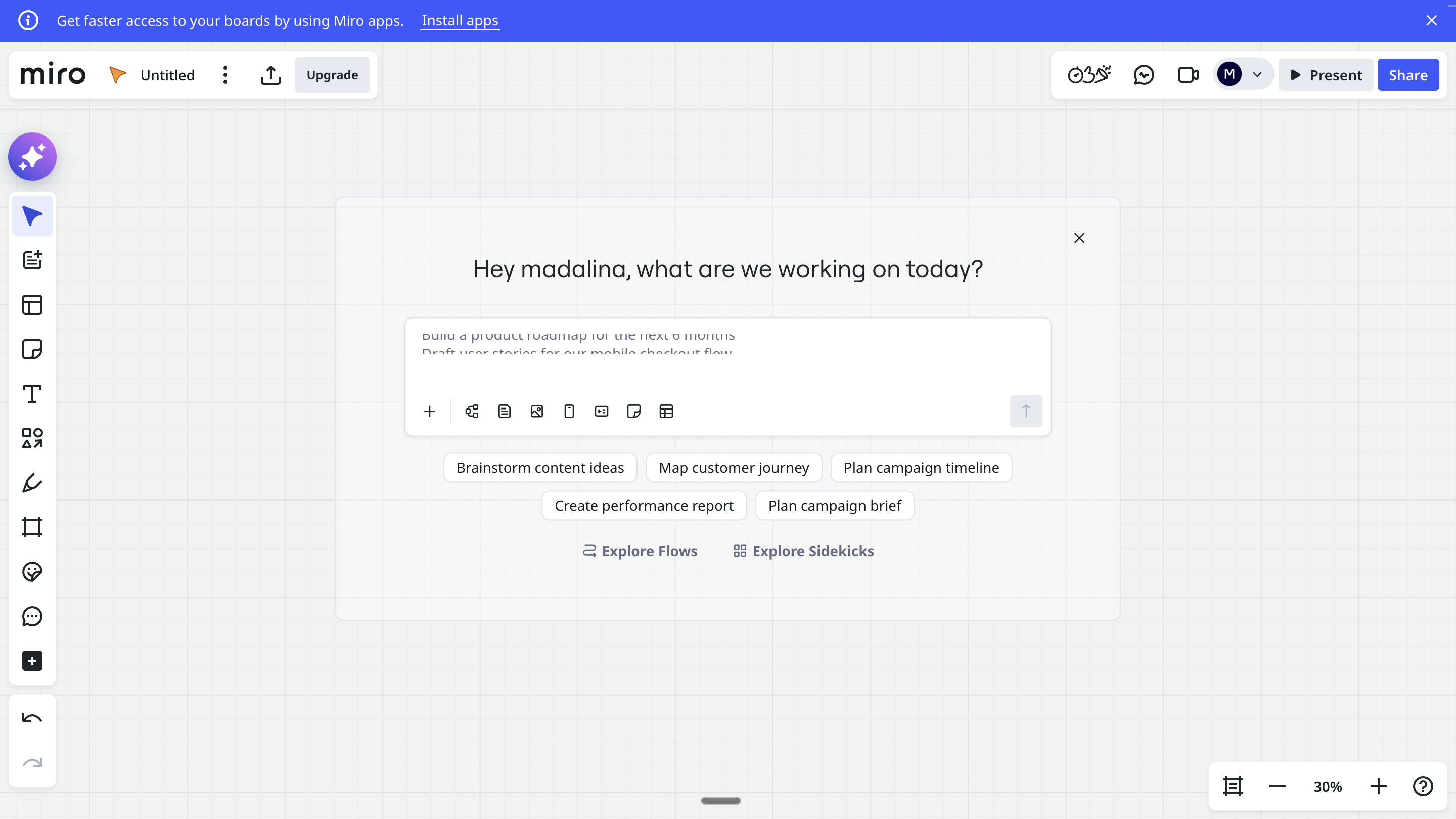
My expectation: describe my workshop, the sections, the audience, what I'm trying to achieve, and have AI do the heavy lifting. Identify the right template. Adjust the copy with my context. Save me an hour of dragging boxes around.
What I got instead: a formatted text block based on my prompt. My own words, slightly reformatted. No board. No sticky notes. Not even a template suggestion.
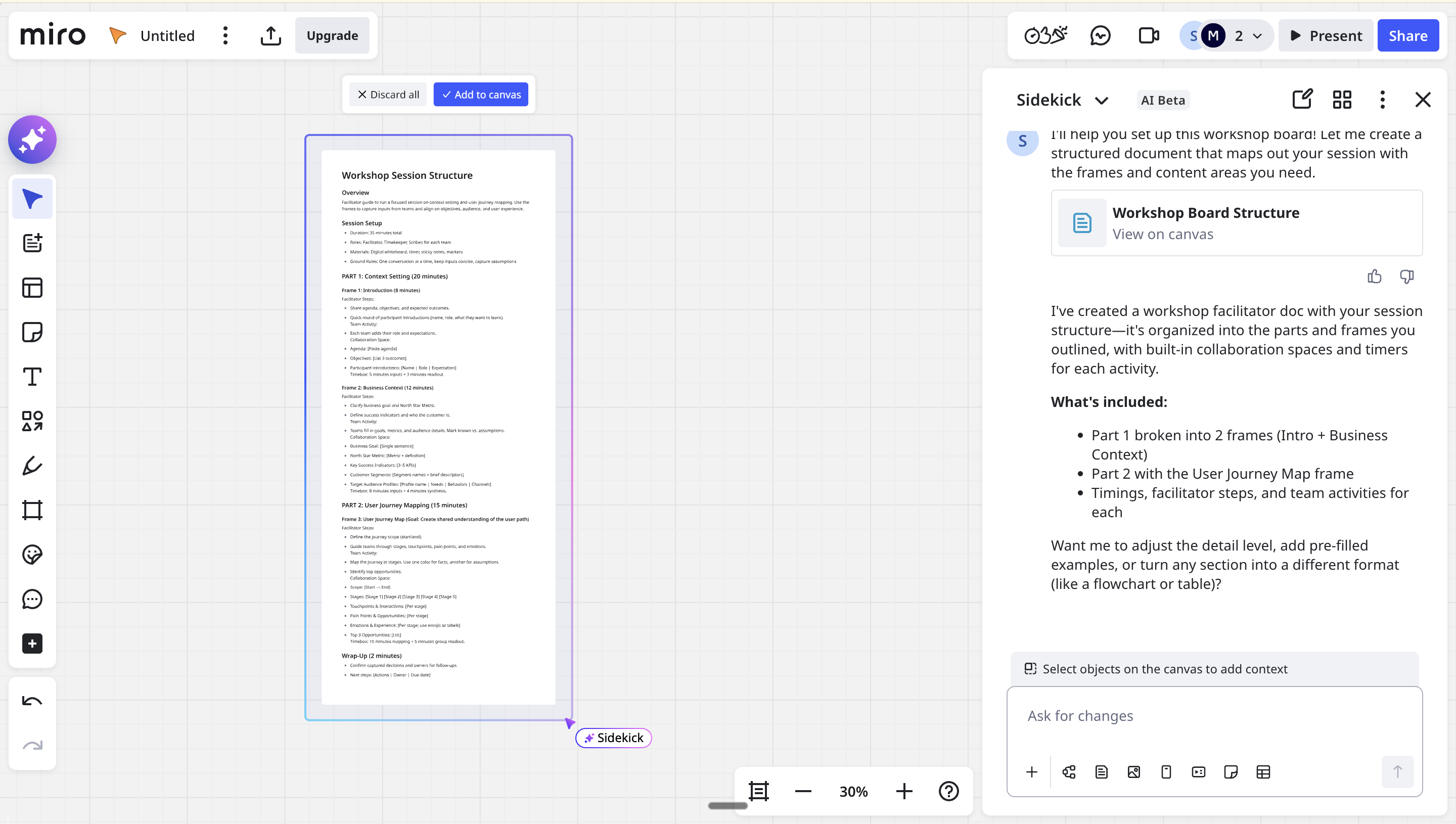
I had typed a long, detailed prompt to give enhanced context. And I got a highly disappointing result.
I closed Miro and went to FigJam to create my board, not because FigJam had a better AI feature for this, but because I was frustrated by the false promise.
The understanding problem
One quote that stayed with me on good product UX is: good UX is not about removing friction, it's about creating understanding in your product.
Behavioural analysis shows that even high-friction tasks, when user expectations are set properly, can lead to higher conversion rates. When you add AI to your product, you have to ensure you create the right understanding for what the AI can actually do.
When you give users an open-ended interaction like a chatbot, you cannot control what they type. You cannot guide their expectations. And when reality doesn't match expectations, frustration grows fast.
That's what happened with Miro. The chatbot created an expectation it couldn't fulfill.
Elena Verna, Head of Growth at Lovable (the AI company that hit $200M ARR in under a year), recently described a fundamental shift happening in product development:
"We're moving to a new era of software that needs to feel human — that people want to interact with, not just utility of it. Because cost of software is coming down so much to develop that we now can actually invest into emotional feel of that software."
This is the table stakes shift I keep coming back to: when building software becomes cheap, the differentiator moves from can we build it? to does it create understanding? Does it set the right expectations? Does it feel like magic or like work?
How the best products do it
Now contrast this with Netflix.
Netflix is a product I've admired for years: the company, the product, the product philosophy. They've been using AI and machine learning for over two decades. Their recommendation engine is the result of hundreds of engineers working over 20 years, and it's a masterclass in how AI should be integrated into products.
Here's what makes Netflix different: over 80% of content watched on Netflix comes from its personalized recommendations. Netflix has valued the combined impact of personalization and recommendation at an estimated one billion dollars per year in revenue. That's not a small optimization, that's the core product experience.
But the most interesting part isn't the recommendations themselves. It's how invisible the AI is.
Netflix doesn't ask you what you want to watch.
There's no chatbot. No text box. No "describe your mood." You open the app and the right content is already there, presented in a way that speaks specifically to you.
The depth of invisible personalization
A researcher named Niko Pajkovic ran a fascinating experiment to understand how Netflix's algorithm actually works. He created three distinct user profiles: "The Die-Hard Sports Fan," "The Culture Snob," and "The Hopeless Romantic", and watched how Netflix transformed each experience over two weeks.
The results reveal something profound about what invisible AI can actually do.
On Day 1, all three profiles started with virtually identical homepages: what Netflix calls "a diverse and popular set of titles." The Sports Fan watched The Last Dance, the Culture Snob watched The Godfather, and the Hopeless Romantic watched Crazy, Stupid, Love.
By Day 2, each homepage had already begun to shift. For the Sports Fan, Formula 1: Drive to Survive jumped to the first position in the Netflix Originals row, and a "Sports Documentaries" category appeared. For the Hopeless Romantic, the thriller You (about a romantic stalker) became the top Netflix Original, and a row called "Girls Night In" emerged.
By Day 5, a row literally titled "Movies for Hopeless Romantics" appeared on the Romantic's homepage. The Culture Snob's page now featured "Critically-acclaimed Auteur Cinema" at the top.
By Day 7, even seemingly neutral rows had been completely transformed. The "Exciting Movies" row for the Sports Fan now featured CrossFit documentaries and hockey films. The same "Exciting Movies" row for the Romantic? Completely different content.
Here's what's remarkable: even the "Popular on Netflix" row, which you'd assume shows the same content to everyone, was personalized. For the Culture Snob, it featured the award-winning Japanese drama Shoplifters. For the Sports Fan, a soccer documentary. For the Romantic, Fifty Shades Freed.
There is no "objective" Netflix. Every user sees a fundamentally different product.
The same movie, different presentation
The personalization goes even deeper than content selection. Netflix changes how the same content is presented to different users.
Take Outer Banks, a Netflix series about teenagers searching for treasure. The show was recommended to all three test profiles — but with completely different artwork:
- •The culture snob saw a collaged image of the protagonist with a map backdrop — emphasizing the adventure/mystery angle
- •The hopeless romantic saw a close-up of two characters about to kiss — emphasizing the romance subplot
- •The sports fan saw two characters carrying surfboards walking into water — emphasizing the active, athletic elements
Same show. Three completely different visual hooks. Each precisely calibrated to what that user cares about.
By the end of the experiment, the Hopeless Romantic's entire homepage was filled with images of couples embracing. The Sports Fan's page was covered with movement, action, and athletic physiques. The Culture Snob's featured darker hues, black-and-white images, and actor headshots.
Each homepage became its own distinct aesthetic world.
What Netflix understands that most products don't
Netflix has approximately 77,000 "altgenres": hyper-specific categories like "Dark Suspenseful Gangster Dramas" and "Cerebral French Art House Movies." Every film and show has been tagged by human experts with over 200 different story attributes: level of romance, goriness, plot conclusiveness, even the moral status of characters.
This granularity enables what Netflix calls "deep personalization"; they don't have one Netflix product, they have "hundreds of millions of products: one for each member profile."
And crucially: the user never has to ask for any of this.
The Sports Fan didn't type "show me inspiring sports documentaries." The system learned from behavior and delivered exactly that. The Romantic didn't request "movies with romantic embracing imagery." The system anticipated it.
This is what I mean by AI as the expert in your product. Netflix doesn't ask users what they want. It observes, learns, and delivers, like a world-class concierge who remembers your preferences and acts on them before you even arrive.
Netflix developed this over years with significant investment. But with LLMs today, this type of deep personalization is more accessible than ever before.
You don't need Netflix's resources. You need their mental model:
AI that anticipates what users need and delivers it invisibly, rather than AI that asks users to articulate what they want.
The user shouldn't have to work to get value from AI. The AI should work to understand the user.
The best AI features don't ask users what they want. They deliver what an expert would, at exactly the right moment, without the user even noticing.
AI as the expert in your product
When identifying the most valuable use cases for AI in your product, one mental model I keep returning to is: AI as the product expert.
As a product manager or product leader, you are the biggest expert on your product and on your users.
Think about how you would personally guide your users to value if you were standing next to them. That's how AI should be experienced in your product.
This is the mental model I applied when building Lovelaice. We identified the "AI moments" — where, in our 1:1 work with clients, we delivered our expertise and how we transformed their experience. We didn't add a chatbot. We added AI that does the heavy lifting at exactly the right moment. That acts as if we are personally coaching and guiding each user.
Think about a five-star hotel versus a chatbot at the entrance.
At the five-star hotel, your room is ready when you arrive. Your preferences are remembered. Your breakfast is prepared. You never had to ask for any of it.
The chatbot approach is like putting a text box at the hotel entrance: "Type what you need and we'll try to help."
One feels like magic. The other feels like work.
The Expert Test: A Framework for High-Value AI Features
Here's how to identify where AI creates real value in your product.
Step 1: Map the Expert Moments
Think about your user's journey through your product. Different segments might have different needs and high-leverage points.
At each step, ask: What would an expert in my product do to support the user here?
What action would give the user a clear benefit — save time, lower costs, identify alternatives, make it easier to use, make it personal?
Some patterns I've seen work:
Make the product deeply personal. Think Netflix's home page — but for your product. What would a personalized experience look like?
Help do the heavy lifting. Think the Miro use case done right — identify the right template for me and fill it in with my context. Remove the manual work.
Adapt to user segments. For new users, AI helps them activate. For power users, AI helps them get more with less.
Surface hidden value. What features or options would benefit your users that they don't know about? If you provide reports — payments, finance, analytics — can AI extract insights? Can AI review those reports as an expert and provide recommendations?
Provide in-moment support. Can you spot the moments where users get stuck and have AI help unlock them?
When I was building an AI-native fintech system, one high-leverage task I identified was having AI help set up the optimal financial configuration for the business. Instead of customers selecting what they need from a complex menu, they describe their business and AI identifies the optimal setup. As if I was on a call with the client, guiding them personally.
Step 2: Choose the Right Interface
Once you've identified expert moments, ask: What's the highest-leverage UX to deliver this AI feature?
A chatbot is an option. It's not the only one.
Think about failure modes. When AI gets it wrong in a chatbot, the user sees it immediately. Trust is damaged. But when invisible AI fails, you can fall back to the normal experience. Users don't even notice.
Netflix doesn't ask users what they want to watch. They provide titles most likely for the user to enjoy. They offer several options — not a single choice that removes agency, but not so many that the user is overwhelmed.
The best AI in products is invisible. It feels natural.
Consider:
- •Smart defaults that anticipate user needs
- •Proactive suggestions at decision points
- •Personalized recommendations without asking
- •Auto-completion of tedious tasks
Save the chatbot for when the task is genuinely so variable that users need to articulate what they want.
Step 3: Test Before You Build
Don't assume you know which model or which prompt will work. Don't wait on engineering to fully design the system before testing.
Make your best guess about what user input could look like — free text, user attributes you already have, previous activity logs. Then test it.
Test across:
- •Multiple models — you might be surprised which performs best
- •Multiple prompting techniques — structure matters more than you think
- •Different test inputs — happy paths AND edge cases
What happens for a new user? What happens if someone inputs a question instead of the expected format? What happens with incomplete information?
Once you've tested across 50+ test cases, 5+ different LLMs, and evaluated results — once you've seen most AI failure patterns as far as you can imagine the edge cases — then deploy and monitor.
See how users actually use it. Is it giving high-quality outputs, or just frustrating users?
The Spectrum
Here's a simple way to evaluate your AI feature ideas:
Low value:
- •Started with "where can we add AI?" or the first choice made was the chat-box UX solution
- •Users must articulate what they need
- •Success requires users to know what to ask
- •Failure is visible and damages trust
- •Feels like work
High value:
- •Started with "how would an expert support the user in this moment?" or “how might we solve this problem for our users?”
- •Product understands the user’s context
- •Success feels like magic: even when AI is hidden and not accessible through a chat-box
- •Failure is invisible: falls back to normal experience
- •Product delivers user delight, it feels like a five-star hotel
Most teams default to the left. The magic is usually on the right.
The question that changes everything
The next time someone defaults to "adding a chatbot" or asks "where should we put AI?", try responding with:
"What would an expert do at this moment for our users?"
That one question reframes the entire conversation.
It shifts from technology-first thinking to user-first thinking. From "what can AI do?" to "what does the user need?" From visible AI to valuable AI.
That's the difference between a chatbot that frustrates and AI that feels like magic.
— Madalina
P.S. I'm teaching this full methodology in my Maven course — from identifying high-value AI use cases to systematically testing them before you build. If you want to get ahead of 99% of PMs by actually experimenting with AI hands-on and applying real product thinking,
Enjoyed reading? Add us as a preferred source in Google to support us.
Add Lovelaice as a preferred source