A few weeks ago I was shopping on a large online marketplace and tried its AI shopping assistant. Its job is to help shoppers find the right product. My conversation with it took 11 turns. It lost track of the constraints I gave it. It ran a web search it didn't need, even though the answer was in its own catalog. And at the end, it sent me to a competitor.
I didn't click thumbs down. I closed the chat and bought from a different app.
The team behind that assistant will probably never find out what happened in that conversation. Their feedback widget recorded nothing, so in their numbers it looks like a conversation that went fine. Many product teams rely on exactly this signal: thumbs up and thumbs down, and complaints that reach support. By the time feedback arrives, users have already had the bad experience, and most of them leave without saying anything.
Evals are how you catch these failures before your users do. They don't belong at the end, as a check after release. They are the tool product teams use to build AI into their product that performs really well for their customers, the kind of experience a user can't get from asking ChatGPT or Claude a generic question.
Going into 2027, the question is no longer whether to put AI in the product. The question is which AI products will actually deliver for their users, and which ones will lose them in an 11-turn conversation.
The AI products that win are the ones where product managers encode what they know about their customers into the AI.
A product manager knows things nobody else on the team knows as well: the customer pain points, the needs behind the requests, the outcomes the product has to deliver to fit the product strategy. When that knowledge stays in the PM's head, the AI ends up generic. When the PM encodes it into how the AI behaves and how its quality is measured, the AI becomes really good for those specific users.
AI evals are how PMs do that. They are how you run discovery on an AI product and push its quality up to the level your customers, your product and your business need. That makes evals product work, and it is why PMs should own them, be involved in them and learn how to do them.
I wrote this guide to include all learnings from 2026 and shape it as the complete reference on AI evals for product managers in 2027. It is based on our work with product teams shaping AI inside their products at Lovelaice, over 2,000 AI experiments ran with product teams in manufacturing, compliance, HR tech, procurement, health tech and sustainability.
To make the guide immediately practical, I used one running example: an AI shopping assistant for an e-commerce platform, that carries through every section so each concept ties on something concrete.
What this guide covers
- •What an AI eval is, and what it is not
- •Why evals are the PM's tool for solution discovery on AI
- •Why AI needs a different approach to testing
- •The three levels of evals: human review, code-based checks and LLM-as-judge
- •The PM's eval workflow, whether your feature is live or still an idea
- •From annotations to a rubric, from a rubric to metrics, from metrics to better AI
- •Offline and online evals, and a golden dataset that evolves with your product
- •The metrics that matter, the ones that distract you, and the mistakes PMs made in 2026
How to use this guide
This guide is long. It tries to cover everything, with a practical example for each step. If it feels like a lot on the first read, that's normal. You don't have to take it all in at once.
Read it once from start to finish to see how the pieces fit together. Then save it, bookmark it, and keep it as your reference. When you reach a new part of the work, come back to that section.
Key takeaways
- •An AI eval is a repeatable test suite that scores your AI's output on the specific aspects of quality that matter for your product. Public leaderboards, quick manual tries and production monitoring answer different questions.
- •Evals are solution discovery for AI. There is no single right way to build AI into a product. You find the best setup by experimenting on real data and measuring each option against the same metrics.
- •Start with human review. The PM reads what the AI actually tells users and writes down exactly where it falls short. Every automated eval is built on these notes.
- •Your error categories are your rubric. Group your notes into failure patterns, and those patterns become the quality dimensions you measure. You don't have to come up with the full rubric upfront. You uncover it by reviewing real AI outputs.
- •User feedback is not an eval. Thumbs up and down arrive after the user has already had the bad experience, and most users never click. Use feedback to improve your product, but don't count it as your evals.
- •Use the cheapest check that works. Code-based checks first, LLM judges only for the failures that need judgment, and always calibrated against human labels.
- •You don't need a live AI feature, an expected output or writing code to start with evals. You can start testing with only an idea, build your golden dataset as you go, and do all of it without writing a line of code.
What is an AI eval?
An AI eval (short for evaluation, also called LLM evaluation) is a structured, repeatable test suite that measures the quality of an AI feature's output on the specific aspects of quality that matter for your product. You give the AI a set of representative inputs, score each output on several dimensions with quantitative metrics, usually a binary score (1 for pass, 0 for fail), and track how those scores change across iterations.
An eval answers one question: how good is the AI output for my users, measured against my own definition of good? Because the definition is written down, the result can be repeated, shared and trusted.
The same applies whether you are building an AI product from scratch or adding AI inside an existing product. A support chatbot, a document extraction step, an agent that books meetings, a recommendation engine: each one produces an output, and each output can be good or bad for the user in ways you can describe and measure.
Four things are often mistaken for evals:
- •Public benchmarks. A model topping a leaderboard says nothing about how it performs on your data, your task and your edge cases.
- •Production monitoring and observability. Monitoring confirms that the feature responded. A wrong answer never throws an error, so monitoring cannot tell you the content was wrong.
- •A one-time demo. "It worked when I tried it" is an anecdote. An eval measures the full range of inputs the feature will actually receive.
- •User feedback. Thumbs up and down, star ratings and support tickets are lagging indicators. They tell you something went wrong after the user already saw it, and only for the few users who bother to react. The shopper who closes the chat and leaves sends you no signal at all. Feedback is useful for improving your product. It does not tell you how good your AI is, and it can't replace evals.
| Demo or manual try | Public benchmark | Production monitoring | User feedback | AI eval | |
|---|---|---|---|---|---|
| Uses your real data | Sometimes | No | Yes, after launch | Yes, after launch | Yes |
| Repeatable | No | Not applicable | Not applicable | No | Yes |
| Catches silent wrong answers | No | No | No | Rarely | Yes |
| Runs before users see the output | Yes | Not applicable | No | No | Yes |
| Gives you a number you can track | No | Only for the benchmark task | Indirectly | Only from the few who click | Yes |
What changed for PMs going into 2027
The market has already moved. Teams are integrating AI capabilities into their product to speed up time to value and deliver outcomes to customers faster. And as more products ship AI, customer expectations and behaviours change. A generic answer, an agent that takes the wrong action, a chatbot that forgets what the user said two messages ago: users notice, and they leave.
Building AI that performs really well inside a product means being able to experiment on it, test it, validate it and push its quality up, over and over. The instrument for all of that is evals.
For AI products, PMs should shape the AI directly: write the prompts, annotate real AI outputs and write the evals. This often gets read as "PMs should write code." Writing production code and shaping the AI are two different jobs, and the PM has a unique edge in only one of them.
With production code, a PM with a coding agent brings nothing that an engineer with the same agent doesn't already have. With the AI inside the product, it's the opposite. The PM brings something technical skill can't replace: an opinion on how things should be done in their domain, for their users.
The prompt and the evals are where you decide which opinion the product holds. That makes them product work. In most teams, the PM is the person accountable for turning domain knowledge into product decisions, whether that knowledge sits in their own head or with the domain expert they work with.
From the outside, this can look like a PM moving into engineering territory. To me, it's the closest a PM has ever been to shaping the outcome.
We go deeper on how the work splits between product and engineering in who should own AI features in product teams.
Why AI needs a different approach to testing
AI is probabilistic
In traditional software, you define acceptance criteria and engineering or QA writes tests for them. If the test passes once, on one case, the feature will keep working the same way forever, as long as nobody changes the code. The same input always produces the same output.
AI does not work like that. It is a probabilistic system: the same input can produce different outputs on different runs. One hundred successful tests give you no guarantee for case 101. And the space of inputs is endless. Users send empty fields, typos, contradictory instructions and requests nobody anticipated.
On top of that, the most expensive AI failures are silent. A bad output does not raise an error. It returns a confident, well-formatted answer that is wrong, too generic, or just not as useful as it should be. Your monitoring records a success while your user receives a mistake.
One team ran a structured evaluation on its full dataset before deployment and found five distinct failure categories across 36 model runs in 14 minutes. Every one of those failures would have reached production under their previous approach of testing three examples and shipping. We describe the case in why ship and learn does not work for AI features.
There is no one right way to build AI into a product
The second difference matters even more for PMs. When you build AI into a product, there are a lot of ways to do it:
- •one agent or several agents working together
- •which model, or which model for which step
- •what data you send to the model and in what shape
- •which tools and skills the agent can use
- •how the user interacts with it: prompted or unprompted
Nobody can tell you up front which combination will best solve your customer's pain point. You can't research it on paper, and an engineer can't figure it out from the architecture diagram alone. The best setup comes from experimenting on your real data, with a real AI implementation, for your real customer use cases, and measuring the quality aspects that matter for your product, your business and your customers.
This is why evals are a tool for solution discovery. You try different approaches and measure each one against the same metrics. Then you can actually tell whether one approach is better than another, instead of guessing.
The 3 levels of AI evals every PM should know
Every eval falls into one of three levels. In practice you combine all three, and you build them in this order.
Level 1: Human review
Human review is where the PM's expertise comes in most. It is the starting point of evals and the foundation for everything automated. Before anything else, look at what the AI is actually telling users today, and write down exactly where it falls short.
The obvious mistakes are easy to spot. The valuable notes are about where the AI could have done better: the answer that is correct but generic, the recommendation that is fine but misses what this user really needed, the explanation a domain expert would have made sharper.
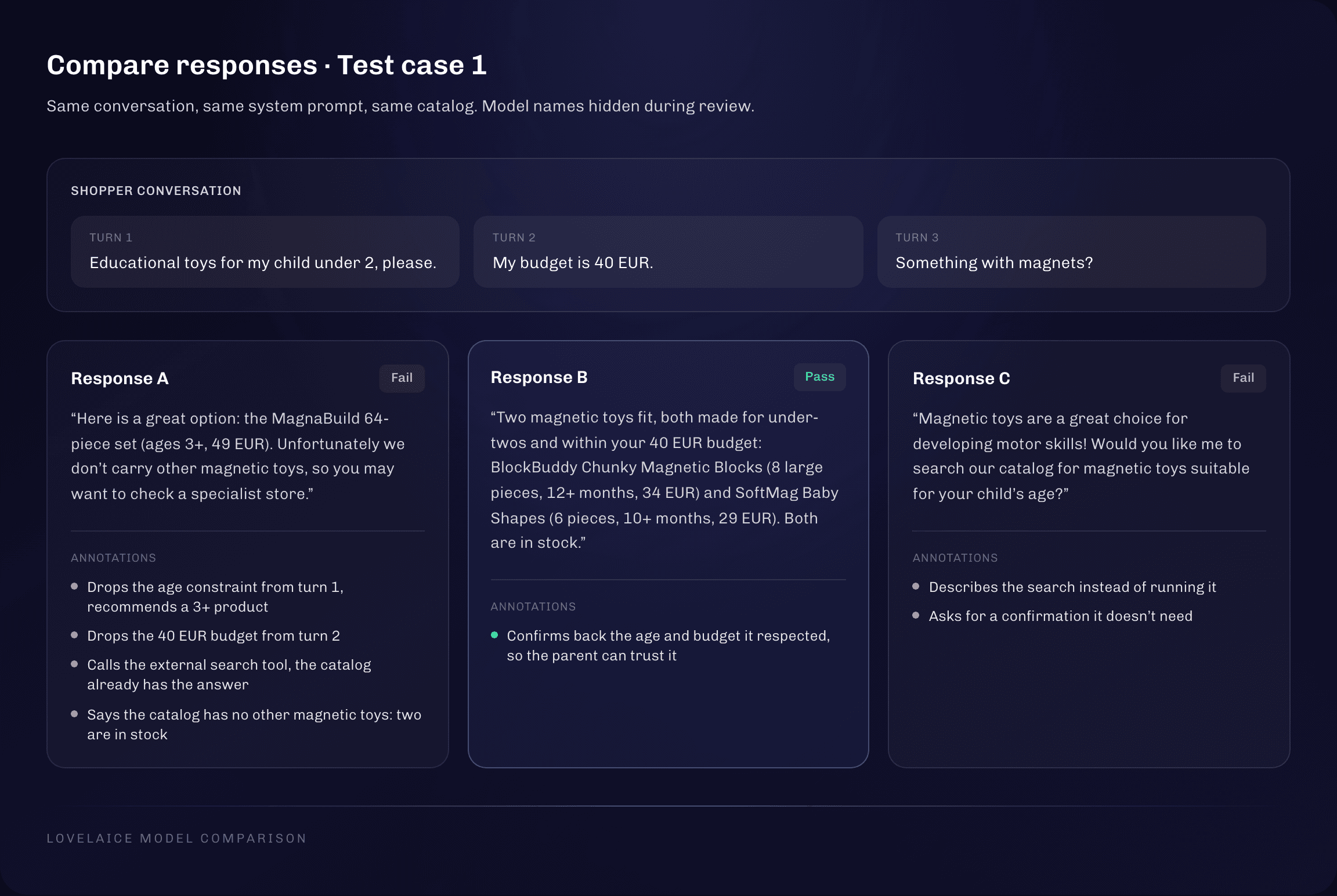
The best way to find those nuances is to compare several models on your exact setup. Run the same system prompt, the same input data and the same user question on several models, and look at the answers side by side. Where they differ, you get clarity:
- •One answer is just one option. Seeing four different answers to the same question shows you how much better the answer could be.
- •You can combine the best parts. One model handles the constraint well, another explains the trade-off better, a third asks the right follow-up question. Each of these is an element you can write into your instructions so your AI gives the best possible answer.
Hide the model names while you review. As soon as you know which model produced an answer, bias creeps in. Blind review regularly overturns a team's assumption about which model is best.
Two more rules make human review work:
- •Describe each failure precisely. "Forgot the age constraint after two turns" can later be grouped and measured. "Wrong answer" gives you nothing to fix or automate.
- •Keep all annotations in one place. PMs, domain experts, compliance and legal reviewers often look at the same outputs. If the notes are spread across documents, chats and spreadsheets, nobody can see the patterns.
Level 2: Code-based (deterministic) checks
Code-based checks are small rules that score one aspect of the output and pass or fail with no ambiguity. They cost almost nothing, run instantly and are easy to set up. You don't need to write the code yourself: you describe the rule, and a tool or an AI assistant writes it. There are two kinds.
Checks against an expected output. When you test your AI, you run it on a set of inputs. If each input also has an ideal expected output, the correct answer you defined, a simple check can compare the actual AI output with it: did it pick the right category, the right tier, the right products?
You don't need expected outputs to start. Teams that already had machine learning in their product usually have them, because training and evaluating those models required inputs paired with the correct answer. Teams starting from scratch usually don't, and that is fine. You can build them out of your testing: when a model gives a good answer, you correct it if needed and save it as the expected output. Our glossary entry on the golden dataset shows how.
Rules that need no expected output. These check a property of the output, sometimes depending on the input. If the input contains a certain piece of information, the output should follow a certain rule. They can look at:
- •the length of the output
- •the structure and format, for example valid JSON
- •the sections the answer must contain
- •the allowed values for a field
- •the tools the agent should or should not call
- •the skills the agent should use
- •content that must never appear
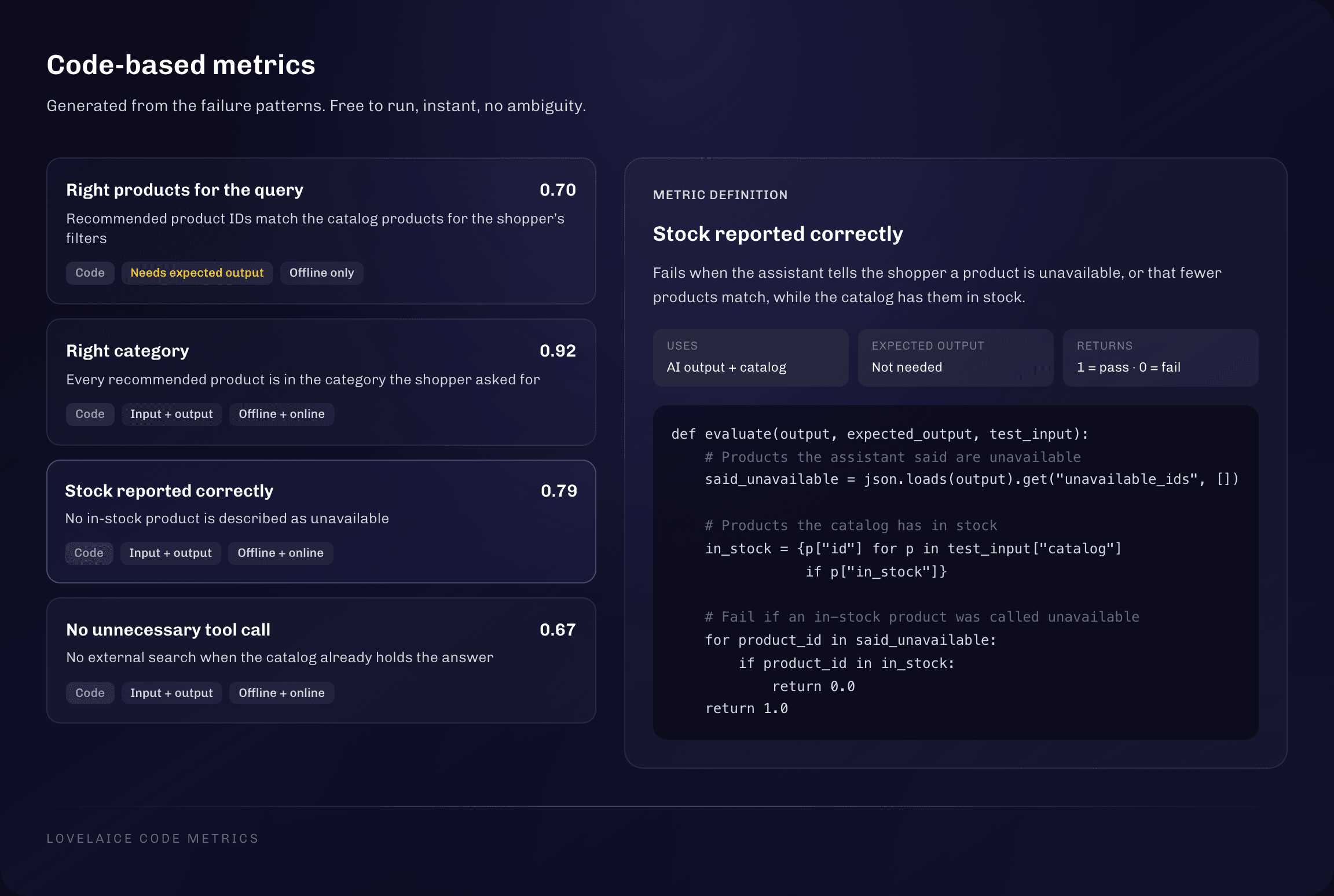
Worked example: deterministic metrics for the shopping assistant. Most of the checks turn out to be deterministic, because the catalog has structured fields to compare against:
- •Right products for the query? Compare the recommended product IDs with the catalog products that match the shopper's filters (category, age, price). Any product outside that set fails.
- •Right category? Check each recommended product's category against the request: toys, lifestyle or computers.
- •Stock reported correctly? Check each product's
in_stockfield. If the assistant claims a product is unavailable when it is in stock, or says only one product matches when several do, the check fails. - •Unnecessary tool call? If the information is in the catalog database and the assistant called the external search tool, the check returns 0.
The first one needs an expected output, the list of matching products. The other three only need the input, the output and the catalog.
Level 3: LLM-as-judge
An LLM-as-judge uses another AI model to evaluate the output of your AI. It reads the output and checks for one specific error, returning 1 (pass) or 0 (fail).
It is the most powerful level and also the most demanding one. It should not be where you start your evals. Set up judges last, and only for high-impact failures that need judgment and that you have actually seen during human review. They cost money on every call and need maintenance over time.
Two rules separate a useful judge from a useless one:
- •One failure per judge. Avoid a big rubric that tries to score every quality aspect of the output at once. A judge designed to look for one particular error is reliable, and it can be calibrated against human labels. "Is this answer good?" can't be validated or acted on.
- •Always calibrate against human labels. A judge has to agree with your human ratings before you trust it. Your annotations from Level 1 pay off a second time here: they become the test dataset for the judge. The judge goes through the same eval process as your main AI, with several prompt iterations and a comparison of models. A judge that agrees with your labels less than 90% of the time will not give you results you can base decisions on.
Our ultimate guide to building an LLM judge you can trust covers the full setup and calibration.
Worked example: an LLM judge for dropped constraints. Respecting the shopper's constraints across a conversation depends on reading intent, so no structured field can check it. It gets a narrow judge:
You are an evaluation judge for an AI shopping assistant on an e-commerce marketplace.
Your task is to assess whether the assistant commits the error "dropping the user
constraint": recommending products that violate constraints the user has expressed.


- Score 1 (PASS): The output respects all constraints the user expressed.
- Score 0 (FAIL): The output drops at least one constraint and recommends products
  that do not match the user's stated preferences or needs.

# Rules
1. Types of constraints: budget, shipping time, product specifications, seller
   preferences, personal preferences. They can be stated as preferences, numbers or lists.
2. Multi-turn conversations: a constraint can be stated in the first message or in any
   later turn. It applies from the turn in which it was stated.
3. Dropping a constraint is justified (score 1) if one of these is true:
   - the user explicitly asked to drop the constraint
   - the user changed or replaced the constraint
   - the user moved to a different product category unrelated to the original request

# Output format
Respond with valid JSON only:
{
  "score": <0 or 1>,
  "justification": "<1-2 sentences explaining your assessment>"
}
Then run the judge on the conversations you already annotated by hand. Where it agrees with you, you can trust it. Where it disagrees, tighten the definition and run it again.
| Eval level | Best for | Cost | Watch out for |
|---|---|---|---|
| Human review | Finding failures and better answers, building the foundation | Your time | Does not scale on its own, needs domain expertise |
| Code-based checks | Comparison with expected output, format, structure, tool calls, objective rules | Close to zero | Cannot score subjective qualities |
| LLM-as-judge | One subjective failure, at scale | Per call | Must be calibrated against human labels |
The PM's eval workflow: two ways to start
PMs come to evals from two places, and both are valid starting points.
If your AI feature is live: review your production traces
In production you already have the most valuable test data there is: real user inputs and the real answers your AI gave. A trace is the complete log of one interaction, including the user input, the model response, the tools it called, latency and token usage.
Pull a representative sample of traces and read them. Include the messy cases and the inputs nobody designed for. A sample of only the good conversations hides the problems you are looking for.
Here's exactly how to import your traces into Lovelaice, so you can start analyzing them right away
If you can't access your traces yet, collect a handful of inputs users actually sent. Set up an experiment with your system prompt, those inputs and the model you use in production, plus two or three others for comparison. The answers will differ slightly from what users saw, but most of the failures they hit will show up again.
If your AI feature is only an idea or on the roadmap: run an experiment
You don't have to wait for engineering to build the feature. You can start testing and creating evals now, and walk into the build with evidence.
- •Make your best guess at the user input. Sketch the inputs you expect, based on the data you can collect from users and how you expect them to interact with the AI. Ten to fifteen diverse test cases are enough to start.
- •Write your best version of the system prompt. Describe the task, the tools the AI can use and the output format as clearly as you can. Keep it simple. The right improvements become obvious once you read the answers.
- •Run it on several models. Even if your company is tied to one provider, the comparison shows you what a good answer can look like.
- •Read and annotate the results. This is Level 1, exactly as above.
You can run this experiment directly in Lovelaice. Paste your system prompt, add your test cases, pick the models you want to compare from 400+ options, and annotate the answers side by side. No API keys and no code needed.
Both paths lead to the same place: a set of real AI outputs in front of you that you read and annotate. Everything after that is the same loop.
The eval loop, step by step
Step 1: Human review first
Read the outputs and annotate them, as described in Level 1. Mark what failed and why, and note where the answer could have been better, especially when you compare models side by side. Thirty to fifty annotated outputs are a good first batch.
Step 2: Find the patterns in your notes
Fixing outputs one by one does not scale. Group your notes into categories that share a root cause. This step is often called error analysis or axial coding, and it is the most valuable eval skill a PM can learn.
Each category should describe one root cause and not overlap with the others. Make categories broad enough to avoid dozens of tiny ones, and specific enough that each one can be measured. For each category, note how often it happens and how bad it is. A rare cosmetic issue and a frequent reasoning error deserve very different priority.
You don't have to do this grouping by hand. Lovelaice runs the error analysis for you: it takes your annotations, and the failures your metrics flag, and groups them into error categories with how often each one happens and how severe it is. It keeps tracking those categories across iterations, so you can see which failures go away after a change and which ones stay.
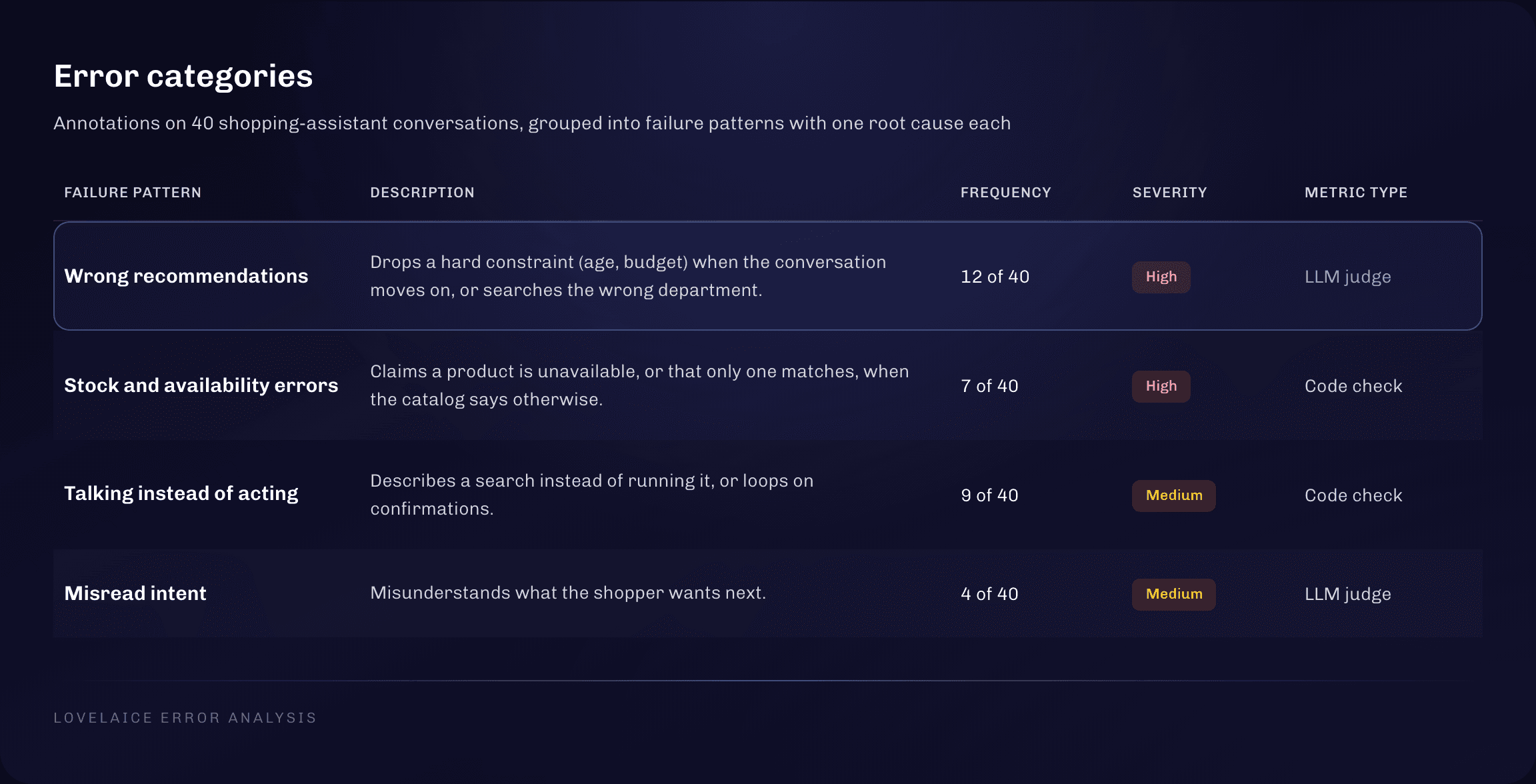
Worked example: failure patterns for the shopping assistant. We annotated 40 shopping-assistant conversations and grouped the notes into four patterns, each with one root cause:
| Failure pattern | What happens | Example | Frequency | Severity | Metric type |
|---|---|---|---|---|---|
| Wrong recommendations | Drops a hard constraint (age, budget) when the conversation moves on, or searches the wrong department | Recommends a 3+ magnetic set to a parent shopping for a child under two | 12 of 40 | High | LLM judge |
| Stock and availability errors | Claims a product is unavailable, or that only one matches, when the catalog says otherwise | "We only have one matching set" while three are in stock | 7 of 40 | High | Code check |
| Talking instead of acting | Describes a search instead of running it, or loops on confirmations | "I can search for that…" with no search executed | 9 of 40 | Medium | Code check |
| Misread intent | Misunderstands what the shopper wants next | Treats "ok, go ahead" as the end of the conversation | 4 of 40 | Medium | LLM judge |
Frequency tells you how often a pattern shows up. Severity tells you how much it hurts the shopper. Talking instead of acting happens more often than stock errors, but telling a shopper a product is gone when it's in stock loses the sale, so stock errors rank higher.
Step 3: Your failure patterns are your eval rubric
The groups you just created are your evaluation rubric. Each one describes an aspect of quality: a failure that should not appear in a good answer, or a quality a good answer should have. This rubric comes from what your AI actually does with your data, so it captures the quality dimensions that matter for your users, which no generic template can. Our article on building an AI evaluation rubric from real outputs walks through this step with a second example.
Step 4: Turn the rubric into metrics
For each dimension in the rubric, define one or more metrics, and pick the cheapest level that can catch it:
- •Code-based checks for anything objective: comparison with an expected output, format, required fields, allowed values, tool calls. Use these first.
- •LLM-as-judge only for what code cannot check, such as respecting user constraints, tone, or missing an important insight. Keep each judge narrow and calibrate it against your human labels.
For the shopping assistant, stock errors and talking instead of acting become code-based checks ("Stock correct" and "No extra tool call"). Misread intent needs an LLM judge, because it depends on reading what the shopper meant. Wrong recommendations get two metrics. A code check ("Right products") compares the recommended products with the catalog products that match the shopper's filters. An LLM judge ("Constraints kept") catches the constraints the shopper stated somewhere in the conversation, which no structured field records.
Keep metrics granular. You can combine them into one score to track over time, but the individual metrics are what show you what actually changed.
The metrics that matter and the ones that distract you
Some common metrics give a false sense of quality:
- •A single quality score without a breakdown. "3.75 out of 5" leaves teams with little to go on to know where the AI struggles in their product and what to improve. Add metrics for each aspect of quality that matters for your product so you can get more information on what the AI handles right and where you need to push quality.
- •"The AI returned an answer." AI almost always returns an answer, so this measures nothing.
- •A confidence score from the same model. Asking the model to rate its own output is an unreliable quality signal.
- •Generic judge templates. Relevance, coherence, helpfulness and hallucination templates from observability tools were built without knowing your failures and were never calibrated against your labels. They give you a number with no idea what went wrong.
- •Thumbs up and thumbs down from users. This is a lagging indicator, not an eval. Few users click, those who do rarely say why, and the ones who leave unhappy usually don't click at all.
The metrics that matter are defined on your own terms:
- •Quality metrics based on your observed failure patterns. No templates or generic metrics can measure what quality means for your AI product or feature. Quality will be measured by multiple different metrics, each scoring a particular aspect of the AI output quality.
- •Cost per request at scale. Every AI request costs money, and your most active users cost the most. In one extraction task across 15 models, GPT-5 reached 60% accuracy while GPT-4o reached 100% at a fraction of the cost. More in the AI cost trap.
- •Latency. In the same task, GPT-4o answered in 4.9 seconds and GPT-5 in 47.6 seconds. Those are two different products.
Step 5: Push the metrics up, across five levers
This is where evals become solution discovery. Your rubric and failure patterns also tell you where to look next. Each pattern points to a likely fix, across five levers:
- •System prompt: sharper instructions, domain context, examples, explicit handling of edge cases. Try this first.
- •Metrics: a failure may reveal a quality dimension you were not measuring yet. Add the eval.
- •Test cases: expand coverage for the failure you just found.
- •Models: compare alternatives on your own metrics.
- •Architecture: split the agent, change the data or tools it can access, or change how users interact with it. This is the biggest lever and can mean reworking existing evals.
Start with the cheap fixes and move to bigger changes only when several iterations bring no progress. Then run the loop again: make a change, re-run, look at the metrics pattern by pattern, decide the next change. Each round makes the AI better and your evals sharper.
Offline vs. online evals
Evals also differ in when and where they run. Offline evals run before users see an output. Online evals run while the feature is live. You need both.
Offline evals: your golden dataset
An offline eval runs on a curated set of test cases that you choose. This is also the only place where your golden dataset lives: test inputs paired with expected outputs that you have checked and approved.
Offline evals do two jobs. The first is building. Before your AI feature reaches a single user, you can test an idea, compare models and setups, and push the quality up iteration by iteration until it meets the bar your customers need. You don't have to ship to production first to create evals or to improve your AI. A lot of the biggest quality gains happen here, before launch.
The second job is protection. Offline evals are your regression net. A regression is a change that makes quality worse without anyone noticing, and the offline suite shows it in numbers before the change ships.
For the shopping assistant, the golden dataset is a collection of representative shopper questions and multi-turn conversations, each paired with the response the assistant should give. Metrics then compare the actual output with that ideal: did it recommend the right products, did it miss any?
Run your offline suite every time something changes that could affect quality:
- •when you update the system prompt
- •when you test a new model
- •when you change the architecture of the AI system
- •when you expand to a new use case or customer segment
- •when you find new failure patterns in production use of your AI system
Online evals: your metrics on live traces
Once the feature is live, users send inputs that are not in your golden dataset, and nobody has written the ideal answer for them. So the metrics that need an expected output cannot run.
Everything else can. Every code-based rule and every LLM judge that only looks at the input and the output can score live traces. You built them as part of your offline suite, and they work in production too. Then compare: if a metric scores 95% offline and 70% on live traffic, your test cases do not reflect how users actually use the feature.
Running every LLM judge on every live trace gets expensive fast, because each judge call costs money. A practical setup is to run the code-based checks on all traces, since they cost close to nothing, and apply the judges only to the answers that pass them. An answer that failed a code check is already flagged. The judge's job is to find the failures code can't see in answers that look fine.
| Offline eval | Online eval | |
|---|---|---|
| When | Before a change ships | Live, on real traffic |
| Data | Curated test cases and golden dataset | Real user inputs |
| Metrics that need an expected output | Yes | No |
| Best for | Comparing prompts, models and architectures, regression testing | Spotting drift, finding failures you never tested |
Your online evals feed your offline ones
The golden dataset changes with your product. At the start you guess the inputs. Once the feature is live, real production cases replace those guesses, including the ones the AI struggled with.
The loop works like this: online evals or a review of fresh traces show where the AI fails in production. You take those cases, write or approve the ideal output for each, and add them to the golden dataset. The next offline run then tests against real usage.
A dataset filled with easy non-diverse cases, like only one user profile and one type of question will score close to 100%. The team concludes the AI is ready and ships a feature that fails on the real range of inputs. A golden dataset of easy cases measures the team's optimism, and tells you very little about quality. Cover the spread of user profiles, question types, edge cases and messy inputs, in roughly the proportions they appear in production.
Common AI eval mistakes PMs made in 2026
- •Validating on three happy-path examples. The demo works, production fails, and the team learns about it from a churned customer or a lost deal.
- •Treating user feedback as evals. Teams added a thumbs up and thumbs down to the AI feature and believed they had evals. They only heard about the failures users bothered to report, after those users had already been let down.
- •Starting with an LLM judge. Teams built judges before reading a single real output, so the judges looked for imagined failures and could not be calibrated.
- •One judge that scores everything. A big rubric in one prompt gives one blurry number and cannot be checked against human labels.
- •Waiting for a golden dataset before testing. Expected outputs are useful but not required. Teams that waited for perfect data lost months they could have spent learning.
- •Handing evals to engineering or QA. Engineering and QA usually check format and structure. The high-impact failures need domain and customer knowledge to spot.
- •Treating the prompt as engineering work. "You are a helpful assistant" is the AI version of a spec that says "make it good". In one test, every model except GPT-5 scored 0% with a basic prompt, and a structured prompt brought several models to 90%. More on this in 3 mistakes PMs make when they let engineers own the AI prompt.
- •Testing one model and one setup. Without alternatives to compare, a team has no way to know if their setup is good or just the first one they tried.
- •Skipping cost. A lot of teams don't know what an average AI call costs them, which leaves big decisions about the feature without data.
Tools for running AI evals as a product manager
A spreadsheet is enough for the first 20 to 50 cases: inputs in one column, outputs in the next, annotations in a third. It stops working once you compare several models and prompt versions, review blind with domain experts, or re-run the same golden dataset after every change.
At that point, look for an evaluation tool where a PM can do the work without an engineering ticket: import traces or upload test cases, run experiments across models, annotate in one place and turn failure patterns into automated metrics.
We might be biased here. We built Lovelaice because every other eval tool we looked at was built for engineers and for monitoring production systems. We believe PMs will be the ones who shape the best AI products, and we built Lovelaice as the AI eval platform for product managers so they can take the reins: it covers the full workflow in this guide, from the first experiment to the golden dataset. If you want to see how it compares, we put it side by side with Braintrust in our Braintrust vs Lovelaice feature review, and compared eight tools, including Confident AI, LangSmith, Braintrust and Langfuse, in our ranking of the best AI evaluation tools for product managers.
The bottom line
Evals are solution discovery for AI. They are how you find out which way of building AI into your product actually solves your customer's problem, and how you keep pushing its quality up after that. Going into 2027, they are one of the most important tools a PM has.
You don't need to learn to code, and you don't need to become technical. Evals are a skill, like writing a good spec or running a good customer interview. If you want to be a PM who builds great AI products, it is a skill you need to master.
Your first step takes an afternoon. Put 20 real outputs in front of you and annotate them. If the feature is live, pull your traces. If it is still an idea, run an experiment on your best guess, on a few models side by side.
Habits are built through reps. If you want to go further, our workshop for product teams takes you through the full loop on your own AI feature: human review, failure patterns, rubric, metrics, and comparing alternatives. You leave with the reps done and an eval suite you can keep using.
Madalina
Enjoyed reading? Add us as a preferred source in Google to support us.
Add Lovelaice as a preferred source